
Guide to Names and Functions of Components

- Do not obstruct the machine's vents. Doing so risks fire caused by overheated internal components.

When touching the machine, you may experience a static shock which is harmless to humans. For details, refer to the following:
https://www.ricoh-europe.com/support/health-safety/ricoh-static-shock.html
Front and Right View
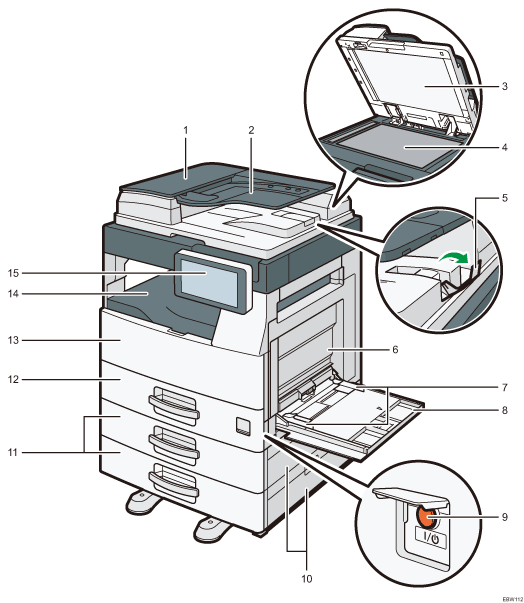
ADF cover
Open this cover to remove originals jammed in the ADF.
Input tray for the ADF
If you load a stack of originals here, the ADF will automatically feed the originals one by one.
Exposure glass cover
Lower the cover over originals placed on the exposure glass.
Exposure glass
Place originals facedown here.
ADF tray extender
Pull this extender out to prevent originals larger than B4 or 81/2 × 14 size from falling.
Right cover
Open this cover to remove jammed paper. To open this cover, first open the bypass tray.
Paper guides
When loading paper in the bypass tray, align the paper guides with the edges of the paper.
Bypass tray
Use the tray to copy or print on adhesive labels or paper that cannot be loaded in the paper trays.
Loading Paper into the Bypass Tray
If you load A4
 , 8.5 × 11 or larger size paper, pull out the extender.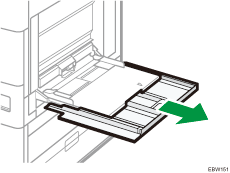
Main power switch
To turn the power on and off, open the cover of the main power switch and press the main power switch.
Tray 2 right cover/Tray 3 right cover
Open this cover to remove jammed paper.
Lower paper trays (Trays 2, 3)
Optional paper trays. Load paper here.
Paper tray (Tray 1)
Standard paper trays. Load paper here.
Front cover
Open to access the inside of the machine.
Internal tray
Copied/printed paper and received fax pages are delivered here.
Control panel
Rear and Left View
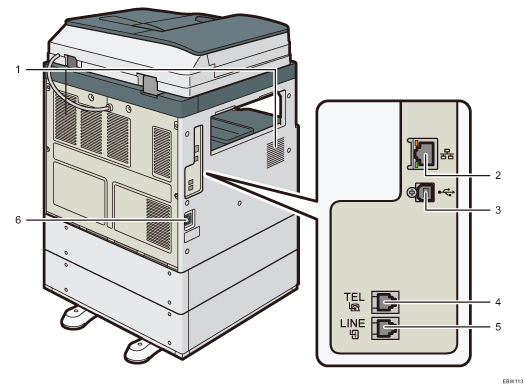
Vents
Holes for ventilating the inside the machine to prevent the internal components from overheat.
After large-volume printing, the ventilation fan may continue to work to lower the temperature inside the machine.
Ethernet interface
Used the port to connect the machine to the network or to use the remote management service (RICOH @Remote) over the Internet.
USB2.0 Interface Type B
Use the port to connect the machine and the computer with the USB cable.
TEL: External telephone connector
Connect an external telephone.
Line: G3 interface unit connector
Connect the line for fax use.
Power Socket
For connecting the power cord to the machine.