
Displaying Frequently Used Functions on the First Screen
You can change the screen that is displayed when the machine is turned on or left without operation for a certain period of time. You can change this from the Home screen to a screen displaying a frequently used function. This is useful to display frequently used functions such as Copy or Scanner.
To display the Home screen, press [Home](
 ).
).
 On the Home screen, press [Settings].
 Press [Screen Features Settings]
 [Screen Device Settings][Function Priority].

 Select the function to display.
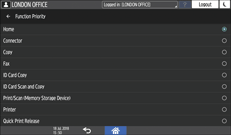
You can select from the installed applications.
You cannot select the following functions:
Settings
Address Book
Browser
Quick Card Authentication Config.
User Guide
Gallery
 After completing the configuration, press [Home]().