Machine Options

For details about the names and the abbreviated names of the options described in this manual, see the following.
Abbreviated Names of Options
Options that can be attached to the machine differ depending on the machine type.
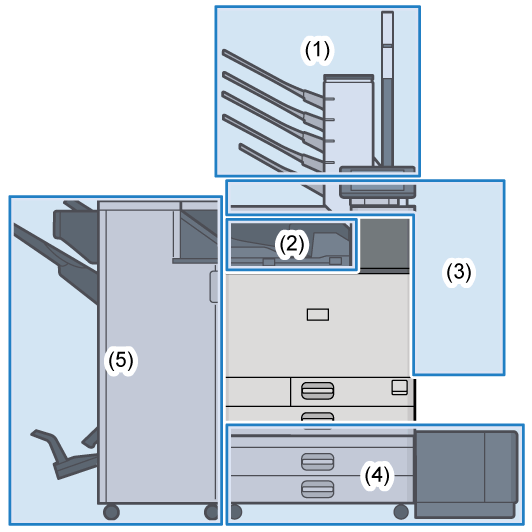
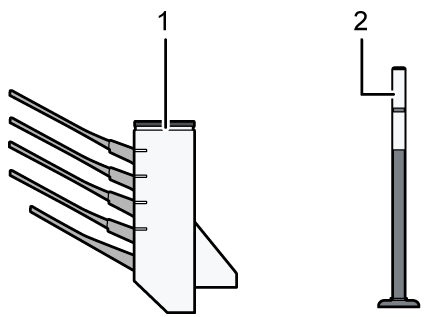
(1) Options Mounted on Top of the Machine
No.
Option
Description
1
Mailbox
Sorts printed paper. Consists of mailbox output trays 1-4.
2
Attention light
The attention light notifies the user by light when there is a paper jam or no paper is left.
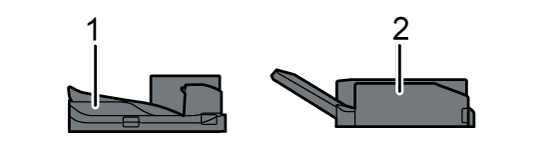
(2) Options Mounted to the Machine’s Paper Output Section
No.
Option
Description
1
Bridge Unit
Relays the main unit and finisher.
2
Internal Multi-Fold Unit
Folds the printed paper in half fold, letter fold-in, letter fold-out, or Z-fold.
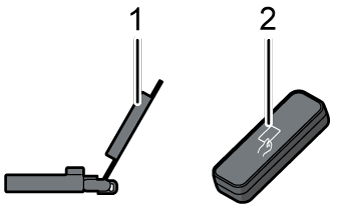
(3) Options Mounted on the Machine’s Side Panel
No.
Option
Description
1
Banner Paper Guide Tray
Banner paper is loaded here.
2
NFC card reader
Pass an IC card over the card reader to log in to the machine.
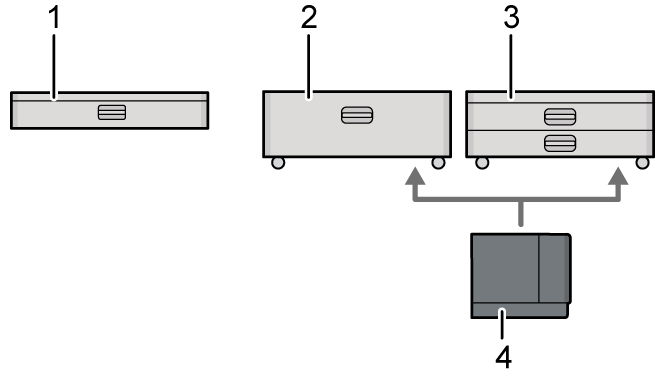
(4) Options Mounted on the Machine’s Bottom
No.
Option
Description
1
Lower Paper Tray
Paper is loaded here. You can load up to 550 sheets of paper.
2
Tray 3 (LCT)
Consists of two paper trays, right and left, for A4
size paper. You can load up to 2,000 sheets of paper.
3
Lower Paper Trays
Consists of two paper trays. You can load up to 1,100 sheets of paper.
4
Large Capacity Tray
Paper tray for A4
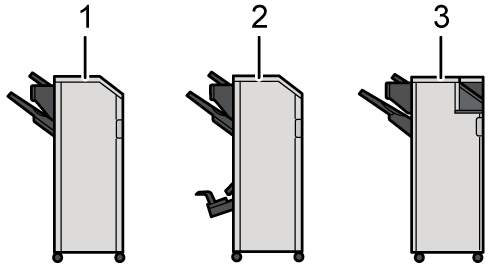
(5) Finisher
No.
Option
Description
1
Finisher SR3320
Sorts, stacks, and staples multiple sheets of paper.
Consists of the following paper trays:
Finisher Upper Tray
Finisher Shift Tray
Copies can be punched if the optional punch unit is installed on the finisher.
2
Booklet Finisher SR3330
Sorts, stacks, and staples multiple sheets of paper. The saddle stitch function can staple multiple sheets of paper in the center and fold them into booklets.
Consists of the following paper trays:
Finisher Upper Tray
Finisher Shift Tray
Finisher Booklet Tray
Copies can be punched if the optional punch unit is installed on the finisher.
3
Finisher SR3340
Sorts, stacks, and staples multiple sheets of paper.
Consists of the following paper trays:
Finisher Upper Tray
Finisher Shift Tray
Copies can be punched if the optional punch unit is installed on the finisher.
The ejected paper can be aligned if the output jogger unit is installed on the finisher. Stapleless stapler function can be used if the stapleless unit is installed on the finisher.
You cannot install multiple finishers simultaneously.
To mount the Finisher SR3320, Booklet Finisher SR3330, or Finisher SR3340, one of the lower paper trays, or tray 3 (LCT) and the bridge unit or internal multi-fold unit must be mounted.
PostScript 3 unit
Allows you to output using Genuine Adobe PostScript 3.
- IPDS unit
Allows you to print using Intelligent Printer Data Stream (IPDS).
XPS direct print card
Allows you to directly output XPS files.
Device server option
Allows you to add an Ethernet port to the printer. Allows you to print using the printer function via a network other than that connected to the machine.
Wireless LAN board
Allows you to communicate over wireless LAN.
Wired LAN and wireless LAN cannot be used at the same time.
SSD Option
Allows you to add 256 GB of internal storage.