Output Tray
This section describes the settings in [Output Tray] under [System Settings].
Setting Items |
Description |
|---|---|
|
Output Tray: Printer |
Specify a tray to which documents are delivered when using the Printer function.
|
|
Output Tray: Printer (Optional Network) (This setting item appears only when the device server option is installed.) |
Specify the output tray to deliver the paper printed by print jobs that are executed via the device server.
|

The output tray depends on the installed external units. For details, see "Supported Output Trays" below.
Depending on the external units installed on the machine, trays that you can specify might differ for [Output Tray: Printer] or [Output Tray: Printer (Optional Network)]. The output tray names displayed on the control panel and the corresponding actual paper output destinations are as described below:
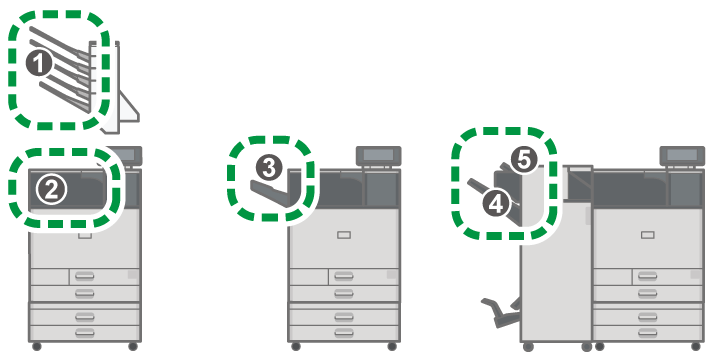
No. |
Displayed Output Tray |
Paper Output |
|---|---|---|
1 |
Mailbox Tray 1 – 4 |
Mailbox |
2 |
Internal Tray 1 |
Bridge Unit |
3 |
Folding Unit Tray |
Internal multi-fold unit |
4 |
Finisher Shift Tray |
Booklet finisher Finisher SR3320 Finisher SR3340 |
5 |
Finisher Upper Tray |
Booklet finisher Finisher SR3320 Finisher SR3340 |